Showing posts with label comics. Show all posts

Saturday, February 12, 2022

Testing how to add movement to my comic book photos

 Hi All,

One of the benefits of having trouble sleeping is that you sometimes have a lot of time to watch videos and learn how to do things.

It occurred to me that I should see how I could animate my comic videos more. So I watched a bunch of youtube videos on animation, rotoscoping etc.
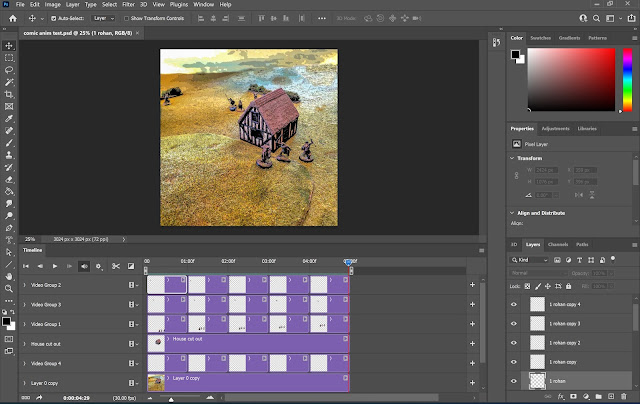

It turns out that there is a time line view for photoshop and your layers can become video segments. My daughter, the animation major, was all like "duh, dad!"

Anyway the gist of it is this. cut out your subjects and put them on their own layers. Do a content aware fill to get a subject free background, and clean up as necessary. Then you can make copies and move them and resize them and drag them into video groups.

This is obviously clunky, I'm doing a position change per second in a 5 second video, so it's very basic. I just wanted to see if I could actually do it. It tried another method converting things into 3D objects,  but I couldn't get it to work for some reason. I'm also not really understanding how to utilize key frames.

Here's the video from Youtube.


Enjoy.

Saturday, February 5, 2022

Camera Raw in Photoshop for tweaking comic photos

 Hi All,

I had one of those "Doh!" moments the other day.

Why wasn't I using Camera Raw to adjust image exposure in these cellphone shots?

As per usual I think I had done things differently in the past and as I got more involved in making comics and switching from DSLR to cellphone I lost some of the technique along the way.

When using DSLR I had always adjusted the RAW images in Lightroom and then exported as JPEG. When I first got into using the Cellphone again I used Snapseed to do something similar. But honestly it was a little bit of a pain doing that on the phone.

I knew about Camera Raw in Photoshop but I didn't remember how to access it. I don't use Adobe Bridge to manage my photos.

So I Googled it.


So we open up our same example photo.


Then Shift+Ctrl+A to open Camera Raw. You now have a Lightroom like menu to make adjustments.


Then I just apply my standard base adjustments. Bring the Highlights all the way down, Pump the Shadows all the way up, and then adjust the Exposure to center the Histogram and pull the Whites and the Blacks back out.


So a big improvement. I could also pump up the saturation, but I could do that with an adjustment layer later as well.

Anyway, it's fun to remember ways to do things that you kind of forgot about.

Happy hobbying.

Monday, January 31, 2022

Dodging in Photoshop to fine tune comics

 Hi All,

Lots of things going on, not much hobby. What I did do though is start looking at techniques for restoring old photos and fine tuning exposure issues in Photoshop.

The video instructions that I found helpful were this one by Karl Taylor and this one by Phlearn.

I've had an issue for a long time in my comics where the figures tend to show too dark. I have known that I could do some things to fix it but hadn't really put in the effort to understand it until now.


You may remember this picture from my last comic. As you can see, the figures are pretty dark and muddy looking. They don't read well.

So let's open it back up in Photoshop and see if we can fix it.


 Here I've reopened the picture and inserted it into the comic template I made. This is the base layer Smart Object being edited. You can also see that I zoomed in on our subjects, the Isengard Uruk Hai.


With your layer selected, add a Curves adjustment layer.


Pull the Highlights up on the curve. You can see how everything is brighter now.


With the Curves Mask selected press Ctrl+I to invert the mask. Thus removing the Curves effect.


Take you paintbrush and paint White over the areas where you want the Curves effect. I did it a little sloppily here just to give you an idea. I used a soft brush with 50% flow. Building the effect up with a lower flow brush might be better. You can also change the opacity and blend mode of the adjustment layer to further tweak the effect.


Before.


After.

So you see, it just helps bring back detail that got lost and I think makes a big improvement. I'm not sure what took me so long to address this issue, oh well.

I hope you learned something useful.

Hobby your way.

Tuesday, January 11, 2022

First Comic video slideshow

 Hi All,

I just uploaded my first video slideshow of a comic style battle report. I'm actually pretty happy with how it turned out. I'm going to have to dig out a good mic for ADR because what I included in this one is pretty rough.

I had wanted to have Scourge of Iron by Cannibal Corpse be the sound track, but I didn't want the video taken down. After listening to it a million times with the royalty free music I used it has grown on me.

Enjoy.


I'm new to this, so still working things out.

Tuesday, March 2, 2021

Defend the Gate - MESBG:BC

 Hi All,

Last in person game before things really got crazy COVID wise in Arizona.

Again at Fantastic Legions house with his amazing terrain.

I pushed him to 50%, but lost the game because I couldn't get close enough to the gate when I rolled to see if the scenario was over.

Still fun. Enjoy.


I feel like my Uruks outperformed. My dice, for once, were pretty hot. However it was not enough. Lots more work to do on the force.

Not sure what is coming next. I have a few new figures in that are calling to me, so that may get me back to the painting table.

My son got exposed to someone with COVID at school, so we're trying to navigate testing and all that right now. The system is pretty confusing and my attempt to be proactive may be for nothing as we may not get his test results before he's done a full quarantine anyway. Oh well. I guess we're lucky to have gotten this far without having to test.

Hope you all are healthy, safe and getting in hobby where you can.

Sunday, February 28, 2021

Seize Ground - MESBG:BC

 Hi All,

This game was hosted by Brendan. He had a great balcony spot for us to play and do our best to stay socially distant. We only had a couple of instances of rosters blowing off the table.

Neither of us were as good as Fantastic Legions or CJ at remembering the rules, but we rolled dice, drank beer and had fun. I'd call that a success.

On to the report.


I'm sensing a theme with the forces of good. Each individual guy is pretty powerful. The Mirkwood Elves weren't quite as tough as the Rangers, but I had a hard time killing them, only injuring one. Their bows could shoot at me from the objectives they were holding on their side of the table.

One more game to do a report for and then I've got to figure out what to do with myself.

Happy hobbying.

Thursday, February 25, 2021

Photoshopping

 Hi All,

I thought I'd take this moment while we're in between comic reports to talk a little about some of the things I'm doing to manipulate images.

The main thing that gives me the end result is the process of converting a photo image that I learned from the Photoshop Training Channel on Youtube here. I wrote about it on my blog here.

Right now my work flow is to paste new photos into the base layer smart object and then do all the edits in the smart object. It has all of the blood splatter, muzzle flashes, sky backgrounds etc in different layers. I've also put in a blank layer to use the clone stamp tool to fix distracting things in the images in a non destructive manner.

Here's a few examples.


So what we see here are the effects added and the distracting elements of game aids covered up via the clone stamp.


Again with the clone stamp because the perspective of the shot would have been weird to have sky there. Looks like I missed the sliver of table edge in the upper left corner.


Here the perspective was right for sky. I have four or five different sky images in a layer group that I reveal via a layer mask. I sometimes resize and reposition in a given series, but I don't change the base sky image for that particular comic. The background and table weren't super cluttered or distracting, but I thought it would help with the story immersion if I covered it up.


The other thing I'm going to be working on is more photo composites. This is the background I made for the MESBG comic page background. It's made from parts of seven images I found online. I tried the technique of color matching the elements except for the palantir. The only problem was I chose to match to the grey sky that ended up getting washed out in the comic process.

Anyhow, I'm going to start exploring with more photomanipulation and the process of "Photobashing" that concept artists use. I have a lot of bootstrapping to do to get comfortable with attempting to paint or draw digitally.

Next comic hopefully in a day or two.

Monday, February 22, 2021

Hold the Line / A Daring Rescue - Middle Earth Strategy Battle Game : Battle Companies

 Hi All, 

Our next game took place in November. This started a rash of Middle Earth Gaming. My opponent was again CJ. He has been playing since the game came out and used to play Middle Earth Strategy Battle Game in tournaments. (PS, I'm only going to refer to it as MESBG et al from here on out.)

We ended up playing two games, but as I mention in the comic I can't remember the rationale for the second game. I thought that there was something in the injury section that called for it, but I can't find it at the moment.

Once again Fantastic Legions hosted. The terrain is his, the Rangers are CJ's and the Uruks were painted by yours truly.

Please enjoy this two part comic.


The main lesson I learned is, don't have a guy without a shield be your hero even if he looks cool. My strategy of running away worked for the first scenario, but I got my ass handed to me in close combat in the second. Those rangers are tough.

You may have noticed the background of the page. I made it special for this, but of course I covered it up with the panels. If you follow me on Instagram or Twitter you saw it better, but I can share it here too is desired.

Anyway we closed out 2020 and rang in the new year with a couple more games of MESBG:BC.

So you'll be seeing that in the next couple of reports.

Game if you can.

Thursday, February 18, 2021

Breakout from Ville de Williams-Sonoma - Chain of Command

 Hi All,

Found some time to work on the next game. It was about a month after the previous one and I still didn't totally have a handle on the rules. It was the same match up as last time, but this time CJ played the Germans while I played the British.

The terrain and figures were again supplied by Fantastic Legions who GM'd our game alongside Brendan and Adam playing Sovs vs Americans on the other end of the table. The magic of 15mm.

CJ did a great job of laying out the terrain for the game.

Again my memory of what actually happened is pretty foggy. I feel like I pulled out a win, or at least a minor victory at the end with some sniper fire, but they were hidden and so didn't appear in the photos. Doh!

One thing I think I forgot to mention in the last comic is my use of the clone stamp in photoshop to clean up extraneous stuff in the pictures. I used it more heavily here to clean up table edges and game aids/dice so that they didn't distract from the action. I may do a side by side comparison post at a later date.

Any way, please enjoy.


Short and sweet.

I've been looking at more digital art techniques and videos on youtube. So I might be getting crazy with some backgrounds, who knows?

I'm thinking the Middle Earth Strategy Battle Game: Battle Companies stuff is up next, but I haven't migrated it over to the new computer yet.

I also need to get back to actual hobby, not digital hobby. The important thing is I'm having fun, I guess.

Keep finding joy in the process.

Later.

Saturday, January 30, 2021

It's drafty in the trenches - Warhammer Historical: Great War

 Hi All,

Well, new year, new computer, same old hobby. I hadn't intended to sit on this report from last Summer, or ghost the blog so bad, but here we are.

Fantastic Legions and I got together and played this as a pick up game after some other plans to play Middle Earth Strategy Battle Game fell through. I forgot that he blogged about it here. His pictures are way better than mine.

As always, it was a good time. My pictures were a bit junk, so they didn't make the greatest comic. Oh well. Enjoy.


As you can see I tried my hand at adding some clouds to cover the usual off table stuff/ gamer crotch. Once I figured out my workflow it went quickly enough. If you have an opinion on it I'd love to hear it.

Paint 'em if you got 'em.