Hi All,
What with track season coming to a head and allergy/ yard work season in full effect here, I've been limping along on projects.
The main news is I got a new(ish) cellphone with a much better camera than my last. I opted for the Samsung Galaxy S7 Active. I went to the store to compare the LG G6 and Galaxy S8 but decided that there were features on both that I didn't quite need or care for so I went with the older, and soon to be discontinued model. Since two years is an eternity in cellphone time this "older" new phone is a vast improvement on my last.
On to the pics. I have not edited these at all.
The table is a jumble of projects.
Sir Chicken. I didn't get the sides perfectly matched up and made the mistake of allowing the glue overage to fully harden. I got it mostly off by carving out with an X-acto knife. I'll hit it some sand paper to clean it up more. You can get these from Skull and Crown.
Here's the coat of arms I had forgotten that I made. I used Inkwell Ideas Coat of Arms Generator. (I should have cropped the exported file.)
Here is Sir Squires. Lazy internet searching says the Squires coat of arms is a squirrel.
The goat on the helm is a nod to my mom. She has goats.
I've been digging through my figures and located my Curt geld from last year. Not pictured are the gretchin I owe Dave B. One of these days I'll get these finished.
Since I had Friday off I went and collected Dormur from the game store. The guy, same one who was rude when I dropped him off, said they hadn't judged the figures yet. I said I was no longer interested in competing. So my foray into trying to be involved in a local game store has ended in failure. That's ok, I like playing with my Oldhammer bros better anyway.
Lastly, I pulled out my Bretonnians so I could do a deal with Blue for some retainers (pictured) and foot knights (not pictured). I need to find three more bowmen to make a unit of ten. I'm not sure if I'm going to buy some from Foundry or somewhere else.
I'm doing some research into bases as I've run out of 20mm slotted bases. I have an eBay supplier from Hong Kong. I'll share my findings with you in a future post.
Showing posts with label photography. Show all posts
Tuesday, April 18, 2017
Friday, January 8, 2016
Studio shots of vacation figures and Bertok size comparison
Hi All,
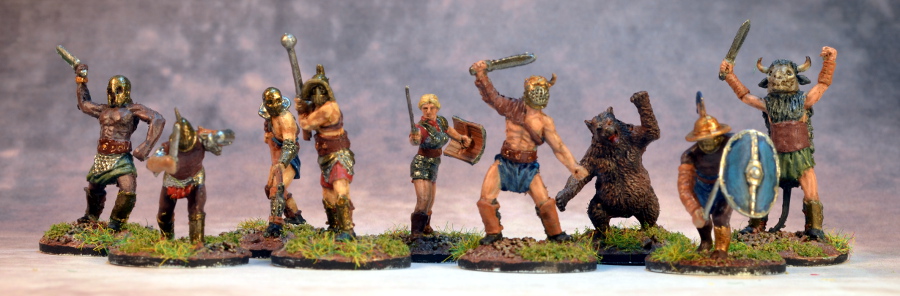
So I tried to take some better shots of the first three entries into the AHPCVI. This is just using my usual desk lamp lighting and laptop control of the camera on a tripod.
I think the layers show up a little better on Bertok. In the previous picture I had to use flash to get enough light.
I probably could have posed these a little better and lit them a little better, again no flash. It was hard to get these guys grouped and in focus on an 8.5" wide background.
Same for the Gladiators. Also the two huys hunching forward just don't photograph well.
Finally you can see how massive Bertok truly is. Because he had a non slotta base I mounted him on the thinnest plywood base I could get from Litko. All the others are your standard ~3mm high plastic base. So yeah Bertok towers over a troll. Maybe I should have based him on a 40mm base.
Anyway thanks for looking and thanks to Armand for linking my last post on TMP.
So I tried to take some better shots of the first three entries into the AHPCVI. This is just using my usual desk lamp lighting and laptop control of the camera on a tripod.
I think the layers show up a little better on Bertok. In the previous picture I had to use flash to get enough light.
I probably could have posed these a little better and lit them a little better, again no flash. It was hard to get these guys grouped and in focus on an 8.5" wide background.
Same for the Gladiators. Also the two huys hunching forward just don't photograph well.
![]() |
| L to R: Eeza Ugezod, Troll, Bertok, The Merchant of Venus XII |
Anyway thanks for looking and thanks to Armand for linking my last post on TMP.
Saturday, September 19, 2015
Paint Table Saturday (Week 38)
Hi All,
I see some prople put up numbers for PTS somewhere in the 90's, but I have no idea what the "official" numbering system is. So I'm going by numeric week of the year.
This week I'm going to show you what I've done thus far up to today. I'm hoping, in this way, to keep you updated but not delay my post until I forget.
I decided to play with doing a rust effect on their silver metallics. I think the sword is a little much, but the axes and mace look good. I'm hoping a wash will bring it together better. I'm noticing that the focus got a little soft around the edges, I'm not sure if that's a lens limitation or if I need to adjust the positioning of the figures or the aperture. I changed it to 6.3 from 5.6 when I noticed some out of focus areas on a 28mm figure I was photographing. I've also stepped the flash compensation back to 0.0, I'm not sure if it's too dark now. What do you think.
I'll be posting about my plans to use the old board game Kingmaker as a campaign map for a War of the Roses game.
Later.
I see some prople put up numbers for PTS somewhere in the 90's, but I have no idea what the "official" numbering system is. So I'm going by numeric week of the year.
This week I'm going to show you what I've done thus far up to today. I'm hoping, in this way, to keep you updated but not delay my post until I forget.
I decided to play with doing a rust effect on their silver metallics. I think the sword is a little much, but the axes and mace look good. I'm hoping a wash will bring it together better. I'm noticing that the focus got a little soft around the edges, I'm not sure if that's a lens limitation or if I need to adjust the positioning of the figures or the aperture. I changed it to 6.3 from 5.6 when I noticed some out of focus areas on a 28mm figure I was photographing. I've also stepped the flash compensation back to 0.0, I'm not sure if it's too dark now. What do you think.
I'll be posting about my plans to use the old board game Kingmaker as a campaign map for a War of the Roses game.
Later.
Tuesday, September 15, 2015
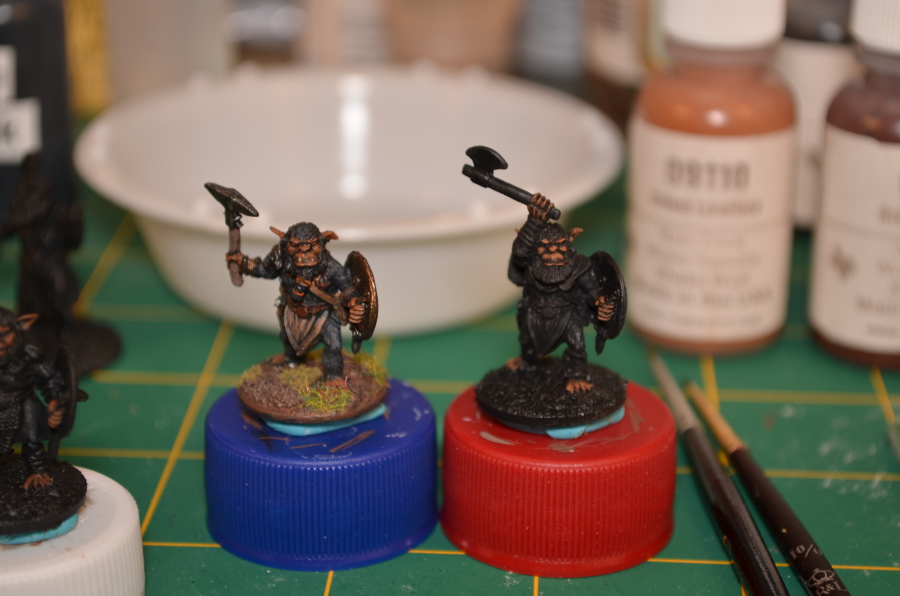
Bugbear painting and photo progress
Hi All,
I'll apologize in advance for the minutiae I'm about to present to you. One of the things I'm trying to do is get back to keeping a painting log so that I can jump back and forth between projects and not have to totally relearn/ wing it in order to match the previous figures.
What I'm trying this time is to dab paint on a note pad and jot down the color and what it's for, taking pictures at every step. Well almost every step.
Above we have the mid layer for the flesh, Reaper Intense Brown. This is over the shade of Ruddy Leather.
Comparison against the previously finished figure. The Highlights have been added. Reaper Oiled Leather. It looks a tad lighter but doesn't have the grunge wash on it yet.
In this last picture I've added some green cloth, earth and leather straps. Home made Vallejo 896, Anita's Earth Brown and Folk Art Nutmeg.
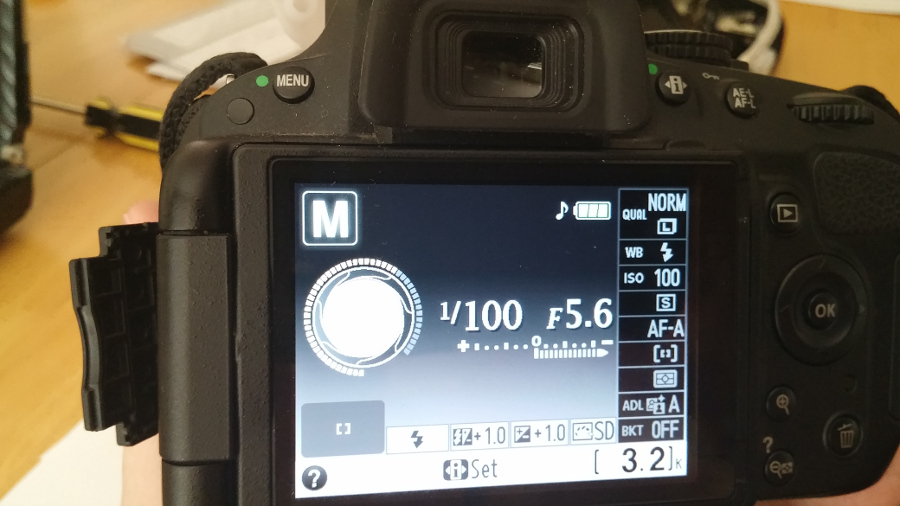
And now a word about the photographs. I have spent a lot of time trying to learn how to use my camera better and can get some pretty good shots when I take a lot of time and control most of the variables. What was frustrating to me was that I was finding it more and more difficult to get decent pictures when I used the presets and just did point and shoot, as most workbench pictures are of necessity. Anyway I was getting more and more frustrated by what seemed to me to be too dark or just not representative colors with the presets and couldn't seem to get the various manual settings I was familiar with to compensate. That is until I tried this:
Several things got me thinking as I tried to photograph these black primed figures that were coming out too dark. Blue had asked me if I was using my flash with diffuser and I told him I wasn't. But I got to thinking, was there a way to adjust things so that I could use the flash and get the images I wanted. With Auto I was getting no flash due to the direct lighting I was using. In portrait I was getting flash but it looked too harsh. In the various manual modes you can adjust the flash, exposure and white balance but I had the aperture and shutter speed set up for remote activation and smaller aperture. It dawned on me that I should try to copy the shutter speed and aperture of the Auto setting with my lighting and exposure tweaks in full on manual mode. In M mode the little thumb dial changes shutter speed, I dialed it to 1/100 sec. Then over to A(perture priority) to thumb the dial to F5.6. The Flash was bumped up to +1.0 from something else I had tried, I forgot about it, and the exposure value was bumped up to +1.0. If that hadn't given me what I wanted I would have played around with that more. I figured that since I was using the Flash I should white balance for it. Again, if it hadn't worked out I would have noodled around more.
So thanks Blue.
I'll apologize in advance for the minutiae I'm about to present to you. One of the things I'm trying to do is get back to keeping a painting log so that I can jump back and forth between projects and not have to totally relearn/ wing it in order to match the previous figures.
What I'm trying this time is to dab paint on a note pad and jot down the color and what it's for, taking pictures at every step. Well almost every step.
Above we have the mid layer for the flesh, Reaper Intense Brown. This is over the shade of Ruddy Leather.
Comparison against the previously finished figure. The Highlights have been added. Reaper Oiled Leather. It looks a tad lighter but doesn't have the grunge wash on it yet.
In this last picture I've added some green cloth, earth and leather straps. Home made Vallejo 896, Anita's Earth Brown and Folk Art Nutmeg.
And now a word about the photographs. I have spent a lot of time trying to learn how to use my camera better and can get some pretty good shots when I take a lot of time and control most of the variables. What was frustrating to me was that I was finding it more and more difficult to get decent pictures when I used the presets and just did point and shoot, as most workbench pictures are of necessity. Anyway I was getting more and more frustrated by what seemed to me to be too dark or just not representative colors with the presets and couldn't seem to get the various manual settings I was familiar with to compensate. That is until I tried this:
Several things got me thinking as I tried to photograph these black primed figures that were coming out too dark. Blue had asked me if I was using my flash with diffuser and I told him I wasn't. But I got to thinking, was there a way to adjust things so that I could use the flash and get the images I wanted. With Auto I was getting no flash due to the direct lighting I was using. In portrait I was getting flash but it looked too harsh. In the various manual modes you can adjust the flash, exposure and white balance but I had the aperture and shutter speed set up for remote activation and smaller aperture. It dawned on me that I should try to copy the shutter speed and aperture of the Auto setting with my lighting and exposure tweaks in full on manual mode. In M mode the little thumb dial changes shutter speed, I dialed it to 1/100 sec. Then over to A(perture priority) to thumb the dial to F5.6. The Flash was bumped up to +1.0 from something else I had tried, I forgot about it, and the exposure value was bumped up to +1.0. If that hadn't given me what I wanted I would have played around with that more. I figured that since I was using the Flash I should white balance for it. Again, if it hadn't worked out I would have noodled around more.
So thanks Blue.
Tuesday, February 3, 2015
Photographing Miniatures Part 6 - More resources
I came across some more links and thought I should bring them to your attention. It's hard to believe that I last wrote on this subject all the way back in August of last year.
It all started with a link posted by a guy (I'm assuming a guy) named Garfy, over on the Oldhammer facebook group. He posted a link to his smart phone photography tutorial on Tale of Painters here. It is very straight forward and gives you some direction for things to use for taking better cellphone photos. Spoiler Alert: It is all similar stuff to what makes a good photo with any camera.
In this tutorial he also mentions an earlier one on DSLR photography here. Again this is stuff we have covered before, but it is concise and he makes a few good points. I would recommend reading it if you haven't read any intro photography stuff before, but even if you have he makes some good points. One thing that i came away with is that you should try to get your lights far enough away from your subject to help diminish the shadows. Something I'll have to play around with but may not have much ability to change, as I photo on a pretty cramped desk.
The other place I had found a good amount of information is from Henry Hyde in both "The Wargaming Compendium" and Miniature Wargames with Battlegames (361, 377, 378, and 379). So if you are like me and had this book but hadn't read it, or subscribe to the magazine but glossed over the info, go back and give these a read. What I liked about these guides is that he gives a lot of good common sense tips, including perhaps the most important, that it takes practice to get better at photography. Just like anything else. The other thing is that he goes into some thoughts about composition and light at shows and other such places where lighting is sub optimal and you may not have full control over your subject matter.
I will try to get this latest round to spur me forward and finish up my series. If you're having trouble finding them they are:
Part 1 - My Gear
Part 2 - Online Tutorials
Part 3 - Camera Comparison
Part 4 - Interlude
Part 5 - Backgrounds
As always, have fun with your hobby.
It all started with a link posted by a guy (I'm assuming a guy) named Garfy, over on the Oldhammer facebook group. He posted a link to his smart phone photography tutorial on Tale of Painters here. It is very straight forward and gives you some direction for things to use for taking better cellphone photos. Spoiler Alert: It is all similar stuff to what makes a good photo with any camera.
In this tutorial he also mentions an earlier one on DSLR photography here. Again this is stuff we have covered before, but it is concise and he makes a few good points. I would recommend reading it if you haven't read any intro photography stuff before, but even if you have he makes some good points. One thing that i came away with is that you should try to get your lights far enough away from your subject to help diminish the shadows. Something I'll have to play around with but may not have much ability to change, as I photo on a pretty cramped desk.
The other place I had found a good amount of information is from Henry Hyde in both "The Wargaming Compendium" and Miniature Wargames with Battlegames (361, 377, 378, and 379). So if you are like me and had this book but hadn't read it, or subscribe to the magazine but glossed over the info, go back and give these a read. What I liked about these guides is that he gives a lot of good common sense tips, including perhaps the most important, that it takes practice to get better at photography. Just like anything else. The other thing is that he goes into some thoughts about composition and light at shows and other such places where lighting is sub optimal and you may not have full control over your subject matter.
I will try to get this latest round to spur me forward and finish up my series. If you're having trouble finding them they are:
Part 1 - My Gear
Part 2 - Online Tutorials
Part 3 - Camera Comparison
Part 4 - Interlude
Part 5 - Backgrounds
As always, have fun with your hobby.
Monday, January 5, 2015
Update and Glamor shots
Hi All,
Just a quick update as I muddle through all I have to do. I wanted to show you some better shots of the Mother Crushers and Mounts and Riders, now that I'm back home with my regular set up.
Looks like these guys should have been dusted off a little better. Too much static grass and flock randomly about.
I really need to do a blog overhaul and collect my thoughts about 2014 and what the future holds for 2015.
I'd also like to not miss my Friday submission this week, like I did last week.
Just a quick update as I muddle through all I have to do. I wanted to show you some better shots of the Mother Crushers and Mounts and Riders, now that I'm back home with my regular set up.
I need to tidy up the base edges with some black paint.
Looks like these guys should have been dusted off a little better. Too much static grass and flock randomly about.
I really need to do a blog overhaul and collect my thoughts about 2014 and what the future holds for 2015.
I'd also like to not miss my Friday submission this week, like I did last week.
Monday, September 8, 2014
20mm Size Comparison - Splintered Light Fantasy
Hi All,
There was a post on the 1/72 - 20mm fantasy miniature group on Google+ about how some miniatures that Splintered Light had recently acquired measured up to the 1/72 plastics currently available.
Since I have some other Splintered Light minis, I thought I'd show what I have.
For scale I have included an IMEX American GI who stands almost exactly 25mm tall. Next to him is the familiar Fladnag, the Wizard from the Caeser Adventurers set. I have placed them all on washers to start at the same zero.
There was a post on the 1/72 - 20mm fantasy miniature group on Google+ about how some miniatures that Splintered Light had recently acquired measured up to the 1/72 plastics currently available.
Since I have some other Splintered Light minis, I thought I'd show what I have.
For scale I have included an IMEX American GI who stands almost exactly 25mm tall. Next to him is the familiar Fladnag, the Wizard from the Caeser Adventurers set. I have placed them all on washers to start at the same zero.
![]() |
| DRRE07 Rat Warriors 1 |
Saturday, September 6, 2014
Ebay Hammer - more lead
Well I went and did it. I bought a bunch of stuff on ebay. What follows is a documentation of sorts and some things I learned along the way. I don't mean to sound whiny or sour grapes, just to point out some things that I could have done better and observations of a noob to trying to acquire some of this "classic" lead.
Along the way I'll also mention how I photographed things as I am supposed to be writing about photography.
All shots with the trusty Nikon D5100, using the 18-55mm lens. I tried using the M setting ( I need to find my manual to find out what that means) but ended up falling back on A (Aperture Priority). Set to f16, I used a 10sec timed shutter (misplaced my remote) and ended up using the Incandescent White Balance and an EV of +1.0 or zero as the white metal objects were washing out. The background was from a pack of 22" x 28" Poster board bought at Staples. The other side is a lighter blue. The lighting was my same desk lamp setup, but this time no other lights in the room on and dusk outside. The lighting seemed a tad harder than I would like.
The Giant and the Lead Belcher were Buy It Now items, the Wyvern I actually won.
It was only after I got all the stuff that I thought to look it up on The Stuff of Legends. You would think I would look there first but I thought it was complete, although unboxed. The wheels should have spikes and scythes that can mount on. I haven't decided if I will build as is, try to sculpt it, or source a second one to cast the missing parts from.
I was a little bummed when I opened the box and saw that the banner pole had bent and the right wing snapped off. Although it is straight block painting, except for the wash on the scales, it was a solid effort. Someone put some love into it. Now that it's broken I feel there is nothing for it but to strip it. I'm also concerned that it will be impossible to take apart to easily clean and then paint the nooks and crannies of the rider and saddle.
It was looking at this figure on solegends.com that I realized he was missing the sword and barrel. This bummed me out as I had already lost out on an auction for an in box version. I was still feeling the sting of losing and the buy it now price was less than what the other one had gone for. At first the sculpting bodging of the missing items went through my mind. Then I thought I'd look on ebay again, and sure enough there was another in box Giant. I bid on it and won it. It has yet to arrive but I'm going to make a mold of the missing parts and cast them up.
Lastly, on a lark, I picked up a Safari Ltd. Cyclops for $10 at Michaels. I think he would work well for a Warhammer Giant. He's not bad for a prepaint and cheap. Just needs a base. And maybe a paint job if I'm being honest.
So I guess the lesson is, don't give up. Don't pay more than you're willing to pay. Do a little homework to make sure that you know exactly what you're getting and what it is worth to you.
Also anybody have any tips for breaking the Marauder Giant of his base. I'd like to see if can get his feet to hang off less.
Along the way I'll also mention how I photographed things as I am supposed to be writing about photography.
All shots with the trusty Nikon D5100, using the 18-55mm lens. I tried using the M setting ( I need to find my manual to find out what that means) but ended up falling back on A (Aperture Priority). Set to f16, I used a 10sec timed shutter (misplaced my remote) and ended up using the Incandescent White Balance and an EV of +1.0 or zero as the white metal objects were washing out. The background was from a pack of 22" x 28" Poster board bought at Staples. The other side is a lighter blue. The lighting was my same desk lamp setup, but this time no other lights in the room on and dusk outside. The lighting seemed a tad harder than I would like.
![]() |
| Marauder Giant, Azhag the Slaughterer and a Lead Belcher |
![]() |
| Not the right wheels and no scythes. |
![]() |
| 4th Edition I think. Solid, if basic paint job. |
![]() |
| A little oops in shipping. |
![]() |
| I knew this is what he looked like. |
![]() |
| Where the sword should be and a gap that needs filling. |
![]() |
| Other side where the barrel should be. |
So I guess the lesson is, don't give up. Don't pay more than you're willing to pay. Do a little homework to make sure that you know exactly what you're getting and what it is worth to you.
Also anybody have any tips for breaking the Marauder Giant of his base. I'd like to see if can get his feet to hang off less.
Wednesday, August 20, 2014
Photographing Miniatures Part 5 - Backgrounds
Hi All,
I'm sorry this took me so long to put out. Just the usual, got busy/distracted etc. What I want to do today is continue our discussion of camera settings and using backdrops with your figure. For this experiment I used regular pieces of 8.5" x 11" paper (Letter size in the States) as it is the kind of thing most of us have on hand. I just used some cheap 20Lb. (75g/m.sq.) For the white background. Some Parchment colored specialty paper that I used to use for printing out belt rank certificates and then 110Lb. (198.9g/m.sq.) card stock to print out some backgrounds I downloaded.
Camera and Settings
I chose to use my Nikon D5100 for this experiment. The things that remained constant were 18-55mm lens set at 55mm, Auto focus mode, VR stabilization on, A (Aperture Priority) Setting f16, Remote shutter control, on a tripod.
Backgrounds Used
As mentioned above I used Plain White paper (Brightness 92), Parchment (not actual animal hide, but paper) and the Backgrounds from Wirelizard and Massive Voodoo. In fact it was at Massive Voodoo that I found another guide to photography that I, somehow, hadn't seen before. It seems that I could have saved myself a lot of work and just linked you guys to this series. Part 1, part 2. It looks like part 3, on post processing was never done, or at least I can't find it. Anyway more advice from some guys who appear to know their shit (as the saying goes). Perhaps a little contradictory of my findings in places, but interesting none the less.
Figures used
I mainly used our old friend Nar. For the white background I also used Mr. Ouch, a Bretonnian man at arms I painted up for the challenge. I wish I had figures with a little more technique on them to show you, but I shipped those off to Curt. Let's pretend that the figures are world class painted and full of stunning detail. This experiment is more about the effects of the backgrounds on the image. To a lesser extent it is also about the camera settings.
Enough yakking, on to the pictures.
Just a shot from the cellphone to detail the setup. Similar as the last time but with a smaller piece of paper. One issue to be aware of is getting the paper to curve but also allow the miniature to sit flat. I did this with mixed success. I chose the incandescent White Balance setting as the Fluorescent looked way to yellow to me.
First experiment: Setting the White balance.
On the left and the middle the WB setting was Cool Fluorescent. The only difference was that the flash went off on the picture on the left. On the right I changed the WB to Incandescent. I think it looks much better. I sort of feel like Auto WB may be sufficient for me. One thing that jumps out at me is that these all seem way too dark. My usual complaint with figures photoed on a white background. So I will show how the Exposure Value (EV) setting will help with that.
Second: Exposure Value Test
The EV 0 picture is the same as the one above from the white balance test. I then stepped it up incrementally, skipping 0.3 and 0.7, to show the effect. I ended up choosing +1.7 as the EV I would use. I think it's a judgement call.
Third: Comparison with brighter colors.
I just wanted to see what something with a little brighter color might look like. I probably should have spent a little more time on the composition, as the shadows are bugging me. Again +1.7 looks pretty good although +2.0 could work too.
Fourth: Tan backgrounds
All form now on are shot with the same settings. The EV has been left at +1.7. I'm not sure which is best, but I'm leaning towards the one on the right.
Fifth: Blues
Just to see what effect the color has. For this figure I think the Sea Blue doesn't work at all. For me it's a toss up between the Blue and the Blue Grey.
Sixth: Greys
I was beginning to have some issues positioning the figure back in the same spot on these. Maybe i did before but I didn't notice. I'm leaning towards the darker shades.
Seventh: Massive Voodoo Backgrounds
I put the "bright" spot on all of these beneath the miniature. I tend to like the Dark version for Warm and Neutral, while I like the Medium for the Cold backdrop for this figure.
I also played around with putting the "bright" spot behind the figure.
I thought it worked about as well as the gradient backgrounds had.
Final Note: Post processing.
On all of these pictures I scaled the original down to 20% of its full size and stitched them together. The resolution was reduced from the native 300dpi to 72dpi to help display them on the web a little easier. The last photo was reduced to 20%, but left at 300dpi.
So, what do you think? Have I exhausted this topic for you? Are you keen to look into more staged/ diorama type shots? Post processing, interviews with other hobbyists who take good pictures? There is always more I could do, but I don't want to bore you or fill your head with so much info that you are worse off than before. Goodbye for now.
I'm sorry this took me so long to put out. Just the usual, got busy/distracted etc. What I want to do today is continue our discussion of camera settings and using backdrops with your figure. For this experiment I used regular pieces of 8.5" x 11" paper (Letter size in the States) as it is the kind of thing most of us have on hand. I just used some cheap 20Lb. (75g/m.sq.) For the white background. Some Parchment colored specialty paper that I used to use for printing out belt rank certificates and then 110Lb. (198.9g/m.sq.) card stock to print out some backgrounds I downloaded.
Camera and Settings
I chose to use my Nikon D5100 for this experiment. The things that remained constant were 18-55mm lens set at 55mm, Auto focus mode, VR stabilization on, A (Aperture Priority) Setting f16, Remote shutter control, on a tripod.
Backgrounds Used
As mentioned above I used Plain White paper (Brightness 92), Parchment (not actual animal hide, but paper) and the Backgrounds from Wirelizard and Massive Voodoo. In fact it was at Massive Voodoo that I found another guide to photography that I, somehow, hadn't seen before. It seems that I could have saved myself a lot of work and just linked you guys to this series. Part 1, part 2. It looks like part 3, on post processing was never done, or at least I can't find it. Anyway more advice from some guys who appear to know their shit (as the saying goes). Perhaps a little contradictory of my findings in places, but interesting none the less.
Figures used
I mainly used our old friend Nar. For the white background I also used Mr. Ouch, a Bretonnian man at arms I painted up for the challenge. I wish I had figures with a little more technique on them to show you, but I shipped those off to Curt. Let's pretend that the figures are world class painted and full of stunning detail. This experiment is more about the effects of the backgrounds on the image. To a lesser extent it is also about the camera settings.
Enough yakking, on to the pictures.
![]() |
| HTC One X, WB: Incandescent, EV+1 |
First experiment: Setting the White balance.
![]() |
| All the same white piece of paper for background. |
Second: Exposure Value Test
![]() |
| EV 0, +1, +1.3, +1.7, +2.0 |
Third: Comparison with brighter colors.
![]() |
| Again EV 0, +1, +1.3, +1.7, +2.0 |
Fourth: Tan backgrounds
![]() |
| White Paper, Parchment, Wirelizard Tan Gradient |
Fifth: Blues
![]() |
| Wirelizard Sea Blue, Blue and Blue Grey |
Sixth: Greys
![]() |
| Wirelizard Light Grey, Grey, Dark Grey, Black to Grey |
Seventh: Massive Voodoo Backgrounds
![]() |
| Massive Voodoo Warm: Bright, Medium, Dark |
| Massive Voodoo Neutral: Bright, Medium, Dark |
| Massive Voodoo Cold: Bright, Medium, Dark |
I also played around with putting the "bright" spot behind the figure.
| Massive Voodoo Warm Bright Background upside down. |
Final Note: Post processing.
On all of these pictures I scaled the original down to 20% of its full size and stitched them together. The resolution was reduced from the native 300dpi to 72dpi to help display them on the web a little easier. The last photo was reduced to 20%, but left at 300dpi.
So, what do you think? Have I exhausted this topic for you? Are you keen to look into more staged/ diorama type shots? Post processing, interviews with other hobbyists who take good pictures? There is always more I could do, but I don't want to bore you or fill your head with so much info that you are worse off than before. Goodbye for now.
Thursday, August 14, 2014
Photographing Miniatures Part 4 - Interlude
Hi All,
Things on the photography front have not gone apace here at the corner. Yesterday I tried to buy some inexpensive lights to use for back lighting a la Giovanni Azzara, but I didn't want to pay $20 per lamp and all of the $5 lamps had sold out due to the back to school sales.
What I did find this morning, however, was another resource which I think is worth a look.
Table Top Studio's Product Photography Tips.
That page has an excellent explanation of Exposure Value (EV) and what settings to use to get pictures to not look so dark on a white background. They also give you the same tips that I've been giving you about lighting and tripods etc. And the "Hard/ Soft" Light test is genius. They are trying to sell you a light box and other equipment, but the advice is rock solid as far as I can see.
One other point they stress, know how to focus your camera. This is actually a very big deal, especially if you have auto focus. One of the common errors I see in photos of minis is people taking the time to set up the shot and then not paying attention where the focus point is. Maybe you really do want that tree behind you figure in focus instead of the figure, I don't know. Use the trick of pressing the shutter half way to set the focus and then position the camera for the shot.
And because it sort of came up in a comment from the last post, here is a scaled down version of the shot from the Fuji, instead of a close cropped version.
In and of itself, not bad. Just too far away. I doubt many of you are going to use a clunker like this one so it's really all academic.
And a welcome to two new followers:
Panzer Kaput of Panzerkaput's Painted Review. The very talented artist who did Loki's blog header and the Bloggers for Charity logo. He's also got some fantastic looking buildings for VBCW on the blog right now.
Mark G of The Repple Depple Clubhouse has some lovely hotspot markers for 20mm (1/72) games of Force on Force. Hopefully I'll have a chance to dig through his site in the future.
Gotta Run.
Things on the photography front have not gone apace here at the corner. Yesterday I tried to buy some inexpensive lights to use for back lighting a la Giovanni Azzara, but I didn't want to pay $20 per lamp and all of the $5 lamps had sold out due to the back to school sales.
What I did find this morning, however, was another resource which I think is worth a look.
Table Top Studio's Product Photography Tips.
That page has an excellent explanation of Exposure Value (EV) and what settings to use to get pictures to not look so dark on a white background. They also give you the same tips that I've been giving you about lighting and tripods etc. And the "Hard/ Soft" Light test is genius. They are trying to sell you a light box and other equipment, but the advice is rock solid as far as I can see.
One other point they stress, know how to focus your camera. This is actually a very big deal, especially if you have auto focus. One of the common errors I see in photos of minis is people taking the time to set up the shot and then not paying attention where the focus point is. Maybe you really do want that tree behind you figure in focus instead of the figure, I don't know. Use the trick of pressing the shutter half way to set the focus and then position the camera for the shot.
And because it sort of came up in a comment from the last post, here is a scaled down version of the shot from the Fuji, instead of a close cropped version.
In and of itself, not bad. Just too far away. I doubt many of you are going to use a clunker like this one so it's really all academic.
And a welcome to two new followers:
Panzer Kaput of Panzerkaput's Painted Review. The very talented artist who did Loki's blog header and the Bloggers for Charity logo. He's also got some fantastic looking buildings for VBCW on the blog right now.
Mark G of The Repple Depple Clubhouse has some lovely hotspot markers for 20mm (1/72) games of Force on Force. Hopefully I'll have a chance to dig through his site in the future.
Gotta Run.
Tuesday, August 12, 2014
Photographing Miniatures Part 3 - Camera Comparison
This one was a little tougher than the last post. Aside from being busy over the weekend I had to try and figure out how to actually use these things without finding the manuals.
What follows is my attempt to take the same photo with four different cameras. In each case the set up was the same. I used three desk lamps with compact fluorescent bulbs. I don't remember their exact wattage, but I want to say that they were meant to replace 60W bulbs. The two frontal are supposedly daylight and the over head was regular, probably soft white.
I wrapped my baking parchment over the housing of each lamp and used my regular black construction paper background. I used metal book ends to support the back of the construction paper, and used mini wooden clothes pins to secure the construction and baking papers in place.
The figure I chose was my favorite Orc Character. I painted him for the analogue challenge and you can check out the photos I took there. Those were natural light I believe. This figure does not have a lot of technique, in fact it's pretty basic, so that is the only thing I don't have to show you detail photography. I'll keep on working on my painting technique.
What follows is my attempt to take the same photo with four different cameras. In each case the set up was the same. I used three desk lamps with compact fluorescent bulbs. I don't remember their exact wattage, but I want to say that they were meant to replace 60W bulbs. The two frontal are supposedly daylight and the over head was regular, probably soft white.
I wrapped my baking parchment over the housing of each lamp and used my regular black construction paper background. I used metal book ends to support the back of the construction paper, and used mini wooden clothes pins to secure the construction and baking papers in place.
![]() |
| Taken with my cellphone, an HTC One X, 8MP camera, normal setting. |
The figure I chose was my favorite Orc Character. I painted him for the analogue challenge and you can check out the photos I took there. Those were natural light I believe. This figure does not have a lot of technique, in fact it's pretty basic, so that is the only thing I don't have to show you detail photography. I'll keep on working on my painting technique.
Saturday, August 9, 2014
Photographing Miniatures Part 2 - Online Tutorials
Online resources for photographing miniatures.
I figured that I would start where most of us start and look up “photographing miniatures” on the old Google machine. I'll provide a link and a short synopsis of the points I find useful.
[Sorry, this post is super dense verbiage without any pictures. Funny, since it's about photography. If you want to skip to the end, I would read #5 and #6 and the synopsis for the executive summary of what to take away from all this.]
1. LIGHT EM' UP! Tips for Photographing Minis Like a Pro
This article from Bell of Lost Souls is pretty straight forward. What I come away with from this is use lighting on your minis. Three lamps seems to be the magic number. Use “daylight” bulbs. I have some daylight fluorescents, I'm now seeing daylight LED bulbs as well. I'm not sure if one needs to go out and buy a daylight lamp, but if you've got one you should use it. You should also notice that none of the lights in the working example are shining directly on the figure. See my example from the other day that direct light is problematic. Other advice, like use a backdrop etc. are a no brainer. For a competition shot you want no distraction, even for an ebay shot I bet a good picture leads to a better sale. The only thing I don't totally agree with is the white background makes for brighter/better color. To me most figures photographed against a white background don't look as vibrant. Perhaps they look more true in color, but I prefer a dark background.
I figured that I would start where most of us start and look up “photographing miniatures” on the old Google machine. I'll provide a link and a short synopsis of the points I find useful.
[Sorry, this post is super dense verbiage without any pictures. Funny, since it's about photography. If you want to skip to the end, I would read #5 and #6 and the synopsis for the executive summary of what to take away from all this.]
1. LIGHT EM' UP! Tips for Photographing Minis Like a Pro
This article from Bell of Lost Souls is pretty straight forward. What I come away with from this is use lighting on your minis. Three lamps seems to be the magic number. Use “daylight” bulbs. I have some daylight fluorescents, I'm now seeing daylight LED bulbs as well. I'm not sure if one needs to go out and buy a daylight lamp, but if you've got one you should use it. You should also notice that none of the lights in the working example are shining directly on the figure. See my example from the other day that direct light is problematic. Other advice, like use a backdrop etc. are a no brainer. For a competition shot you want no distraction, even for an ebay shot I bet a good picture leads to a better sale. The only thing I don't totally agree with is the white background makes for brighter/better color. To me most figures photographed against a white background don't look as vibrant. Perhaps they look more true in color, but I prefer a dark background.
Friday, August 8, 2014
What's on the bench.
Just a quick post, more to keep up my painting and blogging mojo more than anything else.
Here's a couple of shots from the other day of some 1/72 figures from the Caeser Fantasy Adventurer set.
I'll try to start captioning my photos with what I remember of the camera settings and conditions. These guys were all based and then primed gray. I wanted to try different things with the flesh so three of them have territorial beige (?) as a base flesh color while the odd one out has the yellow ochre to provide a base for Dwarf Flesh. Wartchemakalit (2nd from left) has also had her hair done in Camel I think. Nanoc (far right) has had bestial brown applied to the leathery bits, Botgun Metal on the sword, and some kind of brown (probably Burnt Umber) on the hair.
So I did a little work, apparently fixated on "Not Legolas" (or I guess by my naming convention, Salogel.) The figures with the darker base skin tone have all had Reaper 09045 Tanned Highlight painted on. Nanoc in particular looks a little like how Arnold was painted up in "camouflage" in the 80's Conan the Barbarian.
Well maybe not even. Anyway I ran through all of my new Rosemary & Co brushes and I want to say I did the edge detail on Salogel's tunic with the #1, although it might have been the #0. I got #2 down to #2/0 and they all hold a nice point.
Next up I brought out my oldhammer ball & chain fanatics and Goblin Shaman.
During the Anologue Hobbies painting challenge I painted their flesh in Hauser Light Green. What shocks me now is that a quick perusal of the internet shows nothing but Night Goblin Fanatics. I personally found the Night Goblins to be a total cop out sculpting wise. For me a sea of robed figures is "BORING".
In the above picture I was trying to show the painting of the foot wraps. This is 9AM-ish sunlight through te blinds, directly down onto the table. Too many shadows etc.
Same time, blinds adjusted to be parallel with the sill causing no direct sunlight. Much better. The first of these three was taken in the afternoon. My window faces East, so more direct light in the morning. All of these were also with the Nikon D5100; 18-55mm lens; Macro setting. One other thing I'll note is that in these last two pictures there is a little too much clutter around the figures. The Macro setting can be your friend, by having a short depth of field, but you need to take into account that even blurred out clutter can be distracting. Especially if it is a bright color.
Welcome to R.A.E. Gingerbhoy of Gingerbhoy's Painting Projects, a fine painter and figure converter.
Here's a couple of shots from the other day of some 1/72 figures from the Caeser Fantasy Adventurer set.
![]() |
| Nikon D5100, 18-55mm lens, Macro (Flower Symbol) setting. Afternoon reflected sunlight. |
![]() |
| D5100, 18-55mm lens, Macro Setting, Afternoon sunlight, brighter day? |
Well maybe not even. Anyway I ran through all of my new Rosemary & Co brushes and I want to say I did the edge detail on Salogel's tunic with the #1, although it might have been the #0. I got #2 down to #2/0 and they all hold a nice point.
Next up I brought out my oldhammer ball & chain fanatics and Goblin Shaman.
During the Anologue Hobbies painting challenge I painted their flesh in Hauser Light Green. What shocks me now is that a quick perusal of the internet shows nothing but Night Goblin Fanatics. I personally found the Night Goblins to be a total cop out sculpting wise. For me a sea of robed figures is "BORING".
In the above picture I was trying to show the painting of the foot wraps. This is 9AM-ish sunlight through te blinds, directly down onto the table. Too many shadows etc.
Same time, blinds adjusted to be parallel with the sill causing no direct sunlight. Much better. The first of these three was taken in the afternoon. My window faces East, so more direct light in the morning. All of these were also with the Nikon D5100; 18-55mm lens; Macro setting. One other thing I'll note is that in these last two pictures there is a little too much clutter around the figures. The Macro setting can be your friend, by having a short depth of field, but you need to take into account that even blurred out clutter can be distracting. Especially if it is a bright color.
Welcome to R.A.E. Gingerbhoy of Gingerbhoy's Painting Projects, a fine painter and figure converter.
Thursday, August 7, 2014
Photographing Miniatures part 1 - My gear
I have been thinking about photography, among other things, again. While I was in the middle of thinking about this r.a.e. gingerbhoy of Gingerbhoy's Painting Projects was talking about how he felt he was losing painting competitions because his pictures weren't as good as his opponents. I'm paraphrasing, but you get the idea. This is a big topic, and I don't pretend to have all the answers. But I do have some opinions.
I think I'll try to do a series and see what some of the answers are. But for this one I'll talk about what equipment I use. It's a bit narcissistic, but so is blogging in general.
I have been using a Nikon D5100 for the last couple of years for most of my photography and have been fairly pleased with the results. I bought it on sale at Costco ( a big warehouse store in the US) and it came with a camera bag, 18-55mm and 55-300mm lenses. You can see their current deals here. It's a lot of money, but I use the camera a lot now. Before I would carry around smaller digital cameras and never bring them out. With the big expensive camera I feel compelled to use it to justify its purchase. Although I still forget to break it out at family gatherings and social settings.
Now we could leave off there, but there are a few things that I've acquired since the initial purchase that I find useful. First, especially for shots of miniatures, you need a tripod. I have a standard one from years ago which works fine, but I recently bought a Gorilla Pod flexible tripod. I use it to set up on the game table. I'm still working with it. I think it could be very useful, but so far I haven't done that much with its unique features. I also have a monopod. I use it for photographing outdoor sports, it really helps to get better shots when the kids are running around and you don't have a lot of time to set up the shot. I can't remember if mine was this Dynex one, but I'm pretty sure I didn't pay a lot for it.
Second would be the flash diffuser. Lighting can always be an issue, and to be honest, I don't think I've gotten it licked yet. The diffuser I bought was recommended by Dave D here. (In fact I could have just skipped this whole post and just sent you to Dave's post. It is essentially how I take my pictures now. But I digress.) This gadget really helps dull the harshness of the flash. One day I'll try the other colors, but i use white. I got mine from Amazon here.
Third would be some kind of infrared remote. You can set the timer, but the remote is dead easy to use and takes away any nudging or vibration of the camera. I bought a generic one from Target here, and it works great. Just make sure that the camera has something to focus on. The first time I tried it I think I had the object inside the cameras focal length and it refused to take the picture.
Fourth item is a good camera bag. Now the camera I bought came with a bag, so you may be thinking, why does he need another bag? Well, although serviceable, the bag isn't all that comfortable or easy to get the camera out of when you are running around historical sites. So I bought a sling bag and it's been great. I got the Lowepro Slingshot 250W and it's been great. I will say that the single strap, although great for camera access, can be a little fatiguing when you are on a death march through the Louvre or trying to cram in a lot of site seeing in one day. One salient feature, that I haven't had to use yet, is an integral rain cover that pulls out. Great for sunny old England, although we had hardly any rain during our visit in March.
The last thing I bought, and it is totally unnecessary, was an 18-300mm lens. The stock lenses are very good, but I've been caught many times in sports or on vacation where I had the wrong lens for the job and missed the shot. My solution was a lens that could do a little of everything. I bought this one used, again from Amazon. It is not uncommon for a lens to cost more, sometimes multiples more, than the camera body itself. So you need to get over sticker shock and sort out your price range and what you want from the lens. My hope is that I can get the closeups on the football field and then take a portrait of the team, all without having to try and do a lens change with little time and a lot of dust and dirt flying around.
So there you have it. My fancy camera gear. Next I'll look into various resources for taking good pictures of your minis. I'll try to follow that up with some examples of a setup and try to show the difference between different kinds of cameras. Lastly I may try to look at some examples of miniature photography and see if I can get the photographer to share their process.
Happy picture taking. Or is that camera shopping at this point.
I think I'll try to do a series and see what some of the answers are. But for this one I'll talk about what equipment I use. It's a bit narcissistic, but so is blogging in general.
I have been using a Nikon D5100 for the last couple of years for most of my photography and have been fairly pleased with the results. I bought it on sale at Costco ( a big warehouse store in the US) and it came with a camera bag, 18-55mm and 55-300mm lenses. You can see their current deals here. It's a lot of money, but I use the camera a lot now. Before I would carry around smaller digital cameras and never bring them out. With the big expensive camera I feel compelled to use it to justify its purchase. Although I still forget to break it out at family gatherings and social settings.
Now we could leave off there, but there are a few things that I've acquired since the initial purchase that I find useful. First, especially for shots of miniatures, you need a tripod. I have a standard one from years ago which works fine, but I recently bought a Gorilla Pod flexible tripod. I use it to set up on the game table. I'm still working with it. I think it could be very useful, but so far I haven't done that much with its unique features. I also have a monopod. I use it for photographing outdoor sports, it really helps to get better shots when the kids are running around and you don't have a lot of time to set up the shot. I can't remember if mine was this Dynex one, but I'm pretty sure I didn't pay a lot for it.
Second would be the flash diffuser. Lighting can always be an issue, and to be honest, I don't think I've gotten it licked yet. The diffuser I bought was recommended by Dave D here. (In fact I could have just skipped this whole post and just sent you to Dave's post. It is essentially how I take my pictures now. But I digress.) This gadget really helps dull the harshness of the flash. One day I'll try the other colors, but i use white. I got mine from Amazon here.
Third would be some kind of infrared remote. You can set the timer, but the remote is dead easy to use and takes away any nudging or vibration of the camera. I bought a generic one from Target here, and it works great. Just make sure that the camera has something to focus on. The first time I tried it I think I had the object inside the cameras focal length and it refused to take the picture.
Fourth item is a good camera bag. Now the camera I bought came with a bag, so you may be thinking, why does he need another bag? Well, although serviceable, the bag isn't all that comfortable or easy to get the camera out of when you are running around historical sites. So I bought a sling bag and it's been great. I got the Lowepro Slingshot 250W and it's been great. I will say that the single strap, although great for camera access, can be a little fatiguing when you are on a death march through the Louvre or trying to cram in a lot of site seeing in one day. One salient feature, that I haven't had to use yet, is an integral rain cover that pulls out. Great for sunny old England, although we had hardly any rain during our visit in March.
The last thing I bought, and it is totally unnecessary, was an 18-300mm lens. The stock lenses are very good, but I've been caught many times in sports or on vacation where I had the wrong lens for the job and missed the shot. My solution was a lens that could do a little of everything. I bought this one used, again from Amazon. It is not uncommon for a lens to cost more, sometimes multiples more, than the camera body itself. So you need to get over sticker shock and sort out your price range and what you want from the lens. My hope is that I can get the closeups on the football field and then take a portrait of the team, all without having to try and do a lens change with little time and a lot of dust and dirt flying around.
So there you have it. My fancy camera gear. Next I'll look into various resources for taking good pictures of your minis. I'll try to follow that up with some examples of a setup and try to show the difference between different kinds of cameras. Lastly I may try to look at some examples of miniature photography and see if I can get the photographer to share their process.
Happy picture taking. Or is that camera shopping at this point.
Subscribe to:
Posts (Atom)